
Discovering Hidden Parameters
Many developers believe in obscurity as a defence mechanism, so if a parameter is not documented they believe an attacker won’t be able to find it. Common parameters to look out for:
- Debug parameters
- Internal-only or admin functionality
- Legacy API endpoints
- Undocumented parameters not meant for users
HTML input fields
Section titled “HTML input fields”Scrape HTML elements with id and name attributes by crawling the target site. Tools:
- GoSpider
- GetAllParams
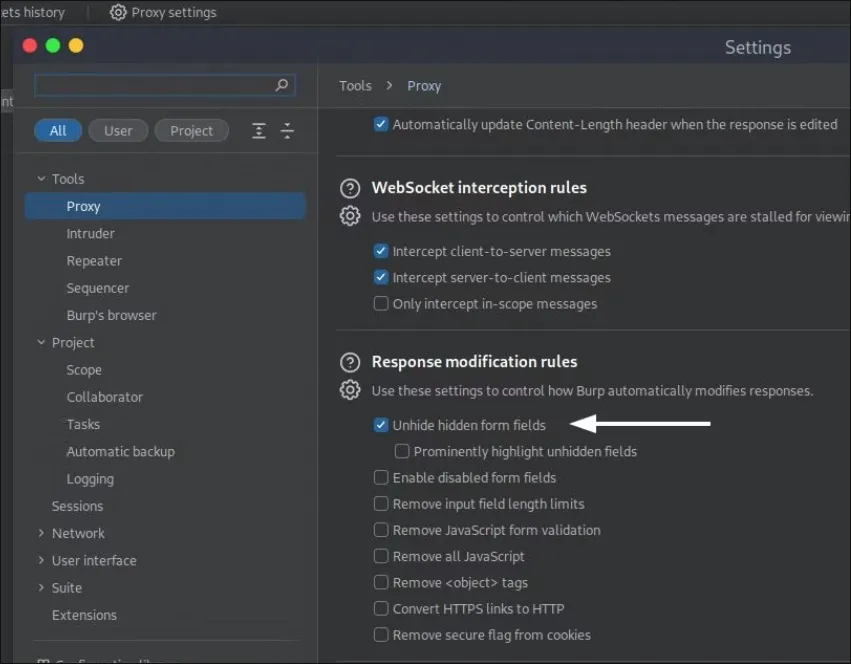
Enable hidden form in burp:
JavaScript file enumeration
Section titled “JavaScript file enumeration”Look for parameters in JavaScript files.
Variable names
Section titled “Variable names”Find variable names in JavaScript files then try each of them as a GET/POST parameters.
see var siteKey = "Uqf9TX"try https://host.com?siteKey=";alert(0)//Intercepting client-side parameters
Section titled “Intercepting client-side parameters”Another way to detect new parameters is to intercept them on the client-side. Tools like Eval Villain allow you to intercept and get notified if any of the supplied input parameters are processed by the DOM. This behaviour often indicates a possible DOM-based vulnerability, such as DOM-based cross-site scripting (XSS).
Google/Github/Wayback Machine enumeration
Section titled “Google/Github/Wayback Machine enumeration”Google dorking
Section titled “Google dorking”site:.example.com inurl:? || inurl:&Same for Bing, DuckDuckGo, Yandex and Github.
Internet Archive
Section titled “Internet Archive”- Go to https://web.archive.org/
- Search for target
- Filter for indexed URLs that contain query parameters.
TIP! Found an interesting JavaScript file? Try to view an indexed version on the Wayback Machine to potentially find even more (legacy) parameters!